Guide · Loud Blocks
How to make a protest poster with bold type
A protest poster has one job: be read from across the street. Big words, loud color, nothing in the way. Here is how to make one in a few minutes.
Start with the words
Write the slogan before you open any tool. Short wins: five to twelve words, one idea. Read it out loud; if you run out of breath, cut it. Put the strongest word where it will land biggest.
1. Open the Loud Blocks look
Go to Loud Blocks in Poster Lab. Every word is stretched to fill its own block of color, and letters change width as if lettered by hand, the way painted protest signs look.
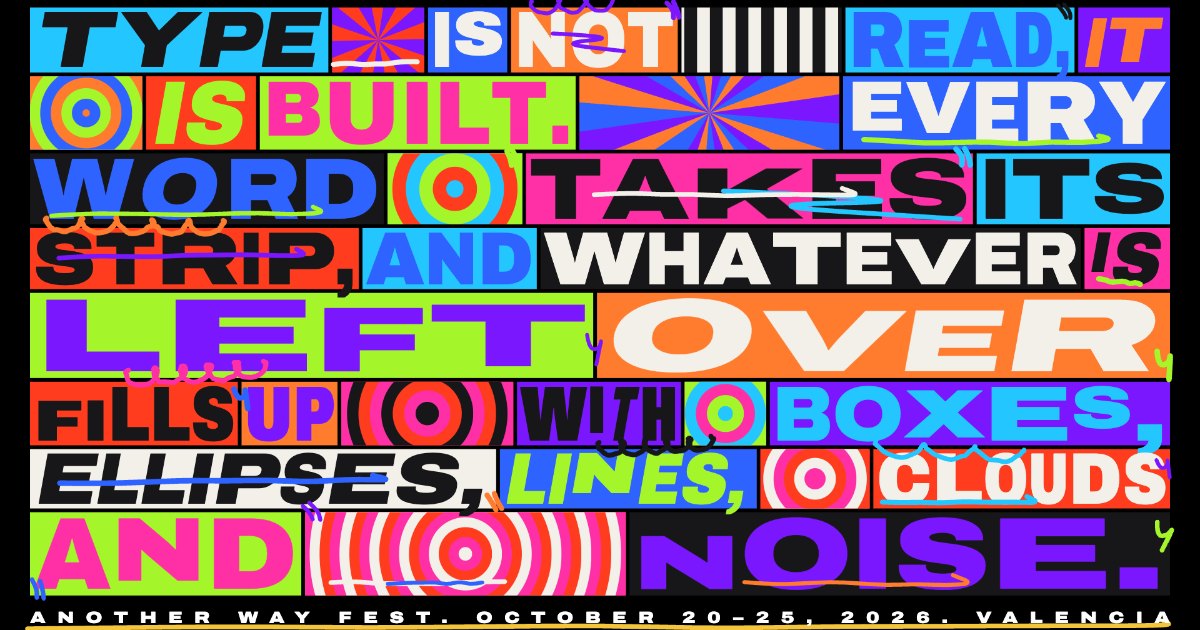
2. Type your slogan
In the Type tab, replace the sample text with yours. Line breaks and word lengths change the blocks, so try a couple of versions of the same sentence.
3. Pick a variant
- Blocks: a color block per word, the classic.
- Mosaic: a cell for every letter, louder still.
- Gradient: no boxes; glowing gradient rows, outlines and solid rows.
- Collage: op-art stripes, checks, rings and wheels between the words.
4. Add the marker strokes
Underlines, quotes, ticks, zigzags and loops scribble on top like someone went over the poster with a marker. Turn each kind on or off and set how many. Every stroke is drawn fresh, so Shuffle until one lands where you want it.
5. Export for print or for social
Choose the canvas format at the top (16:9, 16:10, square, 4:5 or 9:16 for stories) and press Export. For print, export PNG at 4×. For stories and reels, export a WebM video; the strokes and blocks keep moving.
Use the pieces elsewhere
The marker strokes and op-art patterns are in the Loud Blocks kit as SVG, ready to paste into Figma or Illustrator.