Guide · Balloon Type
How to make bubble letters online
Glossy, inflated 3D bubble letters used to mean an evening in Blender. Here is how to make them in a minute, in the browser, for free.
What you will make
A poster where one word is built from inflated balloon letters, glossy and patterned, floating over big calm type. You can also take single letters as transparent PNGs and use them anywhere.
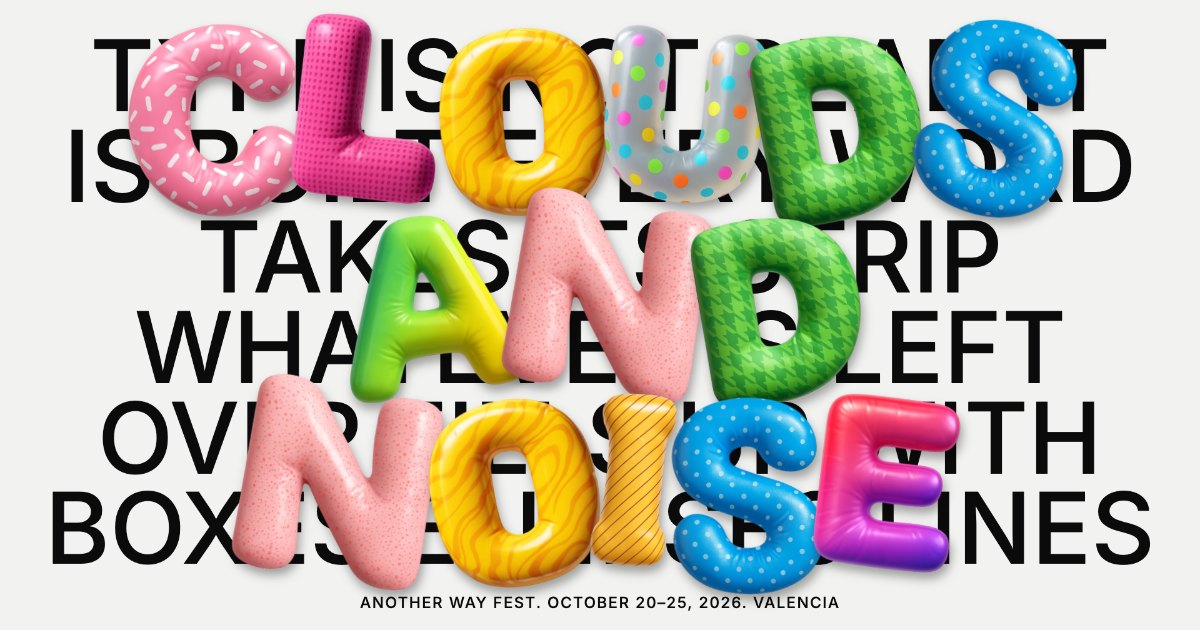
1. Open the Balloon Type look
Go to Balloon Type in Poster Lab. It opens with sample text so you can see how it works. Nothing to install, no account.
2. Write your text and pick the word to inflate
In the Type tab, write your text. Then put the word or short phrase you want as bubble letters in Highlighted word. Letters A to Z, numbers 0 to 9 and a few symbols are supported.
3. Choose a balloon style
There are five sets of balloon letters: neutral, black, color, fluffy and rainbow. Color mixes glossy patterns (dots, sprinkles, stripes, houndstooth) letter by letter; rainbow and fluffy push it further.
4. Light it and tilt it
Move the shadow (softness, distance, angle and color) to place the light, and add tilt and bounce so the letters look like they are floating instead of glued to the page. Press S or Shuffle for a new arrangement.
5. Export
Press Export and choose PNG, WebP or JPG for a still image, or WebM for a video, at 1×, 2× or 4×. 4× is sharp enough for print.
Just need single bubble letters?
The Inflated kit has every balloon letter as a separate image with a transparent background, in all five sets. Press Copy to paste one into Figma, Canva, Keynote or Photoshop.